Setting up assignments (Pro)
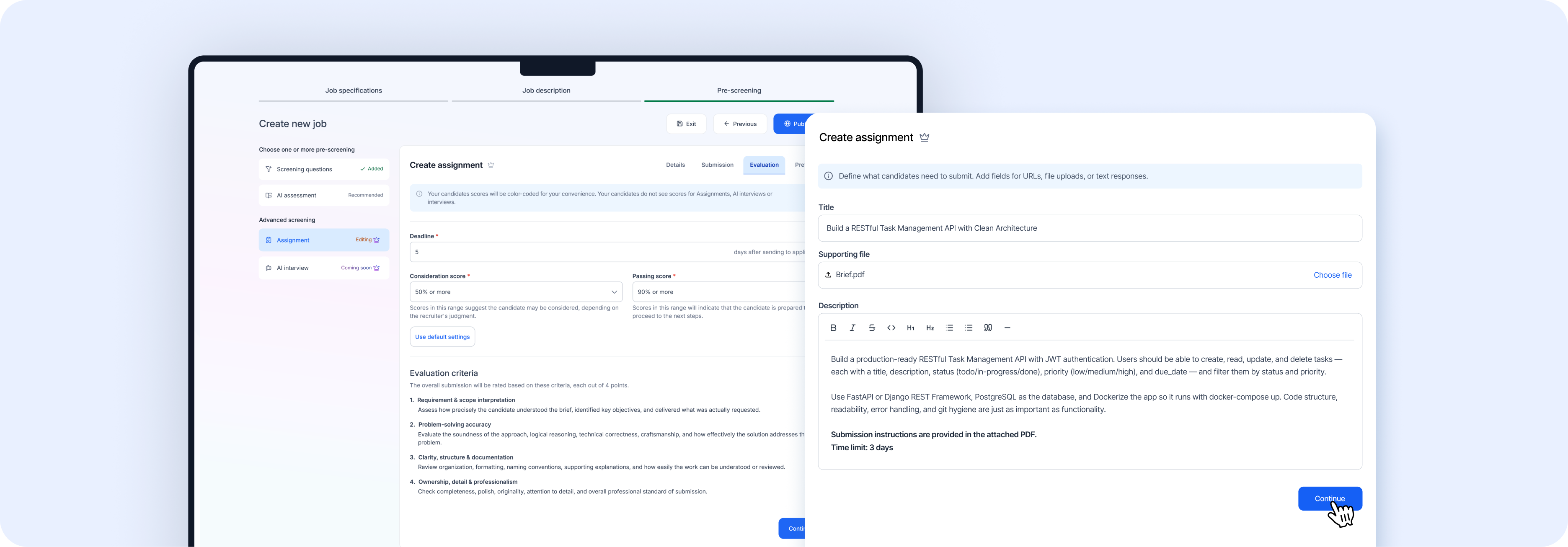 Assignments let you send take-home tasks to candidates as part of the screening process. This is a Pro feature.
When you click Assignment in the left panel of the Pre-screening step, you'll see a 4-tab interface: Details, Submission, Evaluation, and Preview.
Tab 1: Details — define the assignment
| Field | Description | Notes |
|---|---|---|
| Title | A clear name for the assignment | Required. E.g., "Sales Pitch Deck Assignment" or "Frontend Coding Challenge" |
| Supporting file | Upload a reference file | Optional. Click **Choose file** to upload a PDF, doc, dataset, template, or any supporting material the candidate might need |
| Description | Detailed explanation of the task | Rich text editor with 5,000 character limit. Supports bold, italic, headings, lists, code blocks, and more |
What to include in your description:
- What exactly you want the candidate to do
- Any constraints or requirements (e.g., "Use React and TypeScript")
- Expected deliverables (e.g., "A deployed URL and a brief write-up")
- Context about the problem they're solving
- How long you expect it to take
Click Continue when done.
Tab 2: Submission — define what candidates submit
Each submission field has two parts:
- Field name (required) — A label describing what to submit (e.g., "GitHub repository link")
- Field type — URL (great for repos, Google Docs, Figma files) or File picker (for documents, spreadsheets, or code archives)
Click + Add new field to add more fields. Remove any field with the X button next to it.
Click Continue when done.
Tab 3: Evaluation — set scoring criteria
Deadline (required)
Set the number of days candidates have to complete the assignment after you send it. 3–5 days is typical; consider 7+ for larger projects.
Score thresholds (both required)
| Setting | What it means |
|---|---|
| Consideration score | The minimum score at which a candidate *may* be considered. These are borderline candidates where a recruiter's judgment call is needed. |
| Passing score | The minimum score that indicates the candidate is ready to move to the next stage of your pipeline. |
Scores are color-coded in your applicant view. Candidates never see their assignment scores — this is internal to your team only.
How submissions are scored
Every submission is evaluated across 4 criteria, each scored out of 4 points (16 points total):
| # | Criteria | What it evaluates |
|---|---|---|
| 1 | Requirement & scope interpretation | How precisely the candidate understood the brief, identified key objectives, and delivered what was actually requested |
| 2 | Problem-solving accuracy | Soundness of the approach, logical reasoning, technical correctness, craftsmanship, and how effectively the solution addresses the core problem |
| 3 | Clarity, structure & documentation | Organization, formatting, naming conventions, supporting explanations, and how easily the work can be understood or reviewed |
| 4 | Ownership, detail & professionalism | Completeness, polish, originality, attention to detail, and overall professional standard of submission |
Click Continue when done.
Tab 4: Preview — review before creating
This tab shows exactly what the candidate will see when they receive the assignment. When everything looks right, click Create to finalize.
Note: The AI Interview option is coming soon and will allow automated AI-powered interviews with candidates.