Managing your team
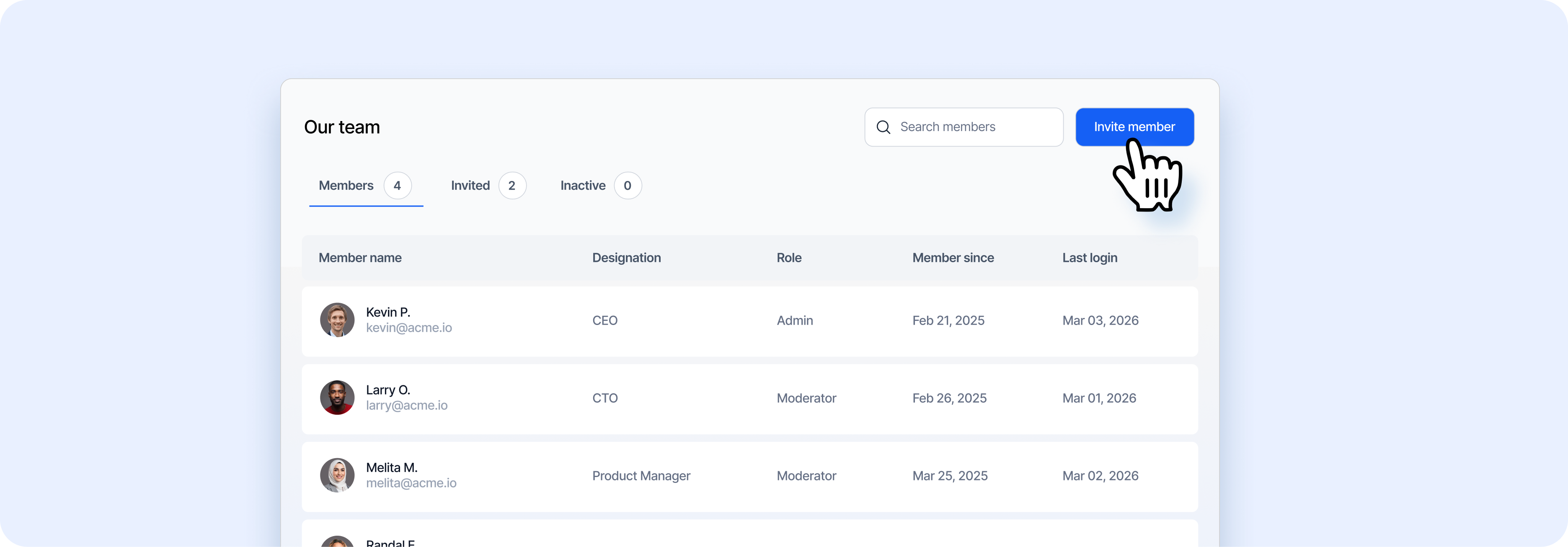 Invite your hiring team to collaborate on Airwork. Go to Settings → Teams tab.
Inviting team members
- Click the red Invite member button in the top-right
- Enter the team member's email address
- Select their role
- Send the invitation
The invitation appears under the Invited tab until the team member accepts.
8.2 Understanding Team Roles
| Role | What they can do |
|---|---|
| Owner | Full access to everything, including billing and team management. Only one owner per organization. |
| Admin | Full access to jobs, applicants, talent network, and company profile. Can manage team members. |
| Member | Can view and manage jobs and applicants. Limited access to settings. |
8.3 Managing Members
The Members table shows:
| Column | What it shows |
|---|---|
| Member name | Name and email address |
| Designation | Their title within your company (e.g., "Owner") |
| Role | Permission level (Admin, Member) |
| Member since | When they joined your organization on Airwork |
| Last login | Their most recent login date |
Use the tabs to view:
Members — Active team members
Invited — Pending invitations
Inactive — Deactivated members